
Stillwind Builder - From Idea to BOM in the order of minutes
Launching Stillwind Builder - The Design Copilot For Electrical Design
A few weeks ago we launched Stillwind Search, a search engine for PCB components that can deal with rough requirements down to precise specifications.
Today we are launching Stillwind Builder, a PCB design agent that uses our search and math to help you assemble a validated BOM for your idea in minutes.
When making a new PCB the schematic drawing and the routing are basically solved; everything before is where it gets tricky.
Say you have an idea: a flight controller for a small drone. While having to satisfy a lot of constraints, the hardest problem usually is to get the power architecture and the motor control right.
A single-cell LiPo feeds the board. A regulator has to turn that changing battery voltage into a stable 3.3 V rail. The MCU, IMU, and GPS module all sit on that rail, each with its own voltage window and peak current draw. Picking any one of them changes what the regulator must satisfy.
Between your idea and a usable BOM usually sit hours of unglamorous work. First nail down the spec and a functional description, working through the design trade-offs as you go. Only then do you start picking components, weaving back and forth between candidate parts to make sure everything actually fits together.
Does the IMU’s supply rail match what your voltage regulator puts out? Does the regulator tolerate the full LiPo voltage range, even when the cell is freshly charged? Did you realize the GPS module’s peak current pushes the 3.3 V rail above the margin you had after choosing the MCU and IMU? If you get any of them wrong, you have to re-spin your design, often involving a lot of back-tracks.
Stillwind Builder solves this problem, bringing you from an idea to a validated and matched design in minutes. While you think about the functional design, Stillwind Builder does the cross-referencing and checking for you.
How it works
Let’s stick with that small drone power-rail system. Stillwind Builder works in three stages.
Design Spec
After prompting Stillwind Builder to help us design a small drone PCB, it will first ask some clarifying questions and then proceed to draft a design document that lays out the functionality of the board. Here we need to nail down the intended flight time, power budget, size constraints, etc.
This step is meant to ground all subsequent steps to a shared source of truth regarding the design.
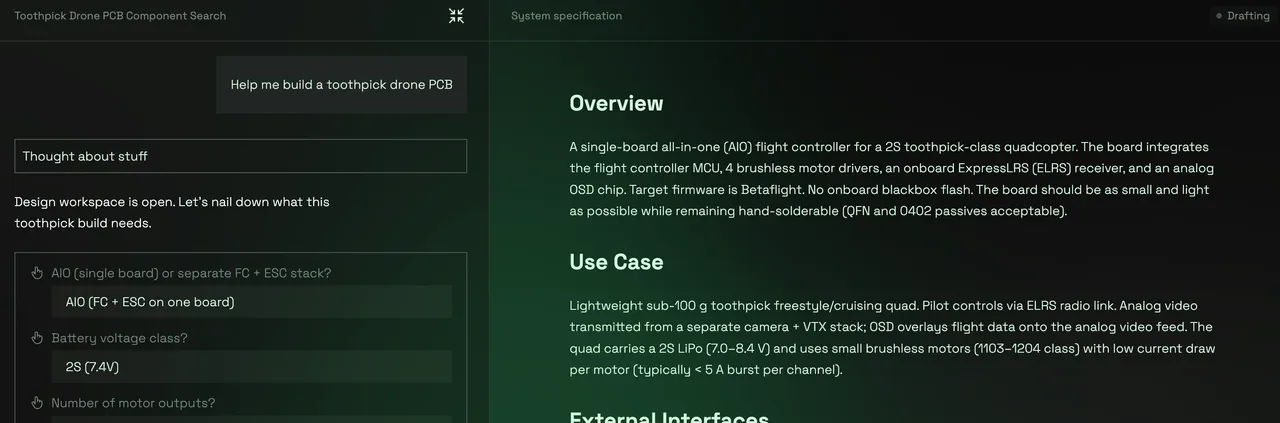
While we can make adjustments, we are happy with the spec and decide to go with the design and the agent moves to the next stage. The agent will now decide on all component slots we need to fill for the BOM.
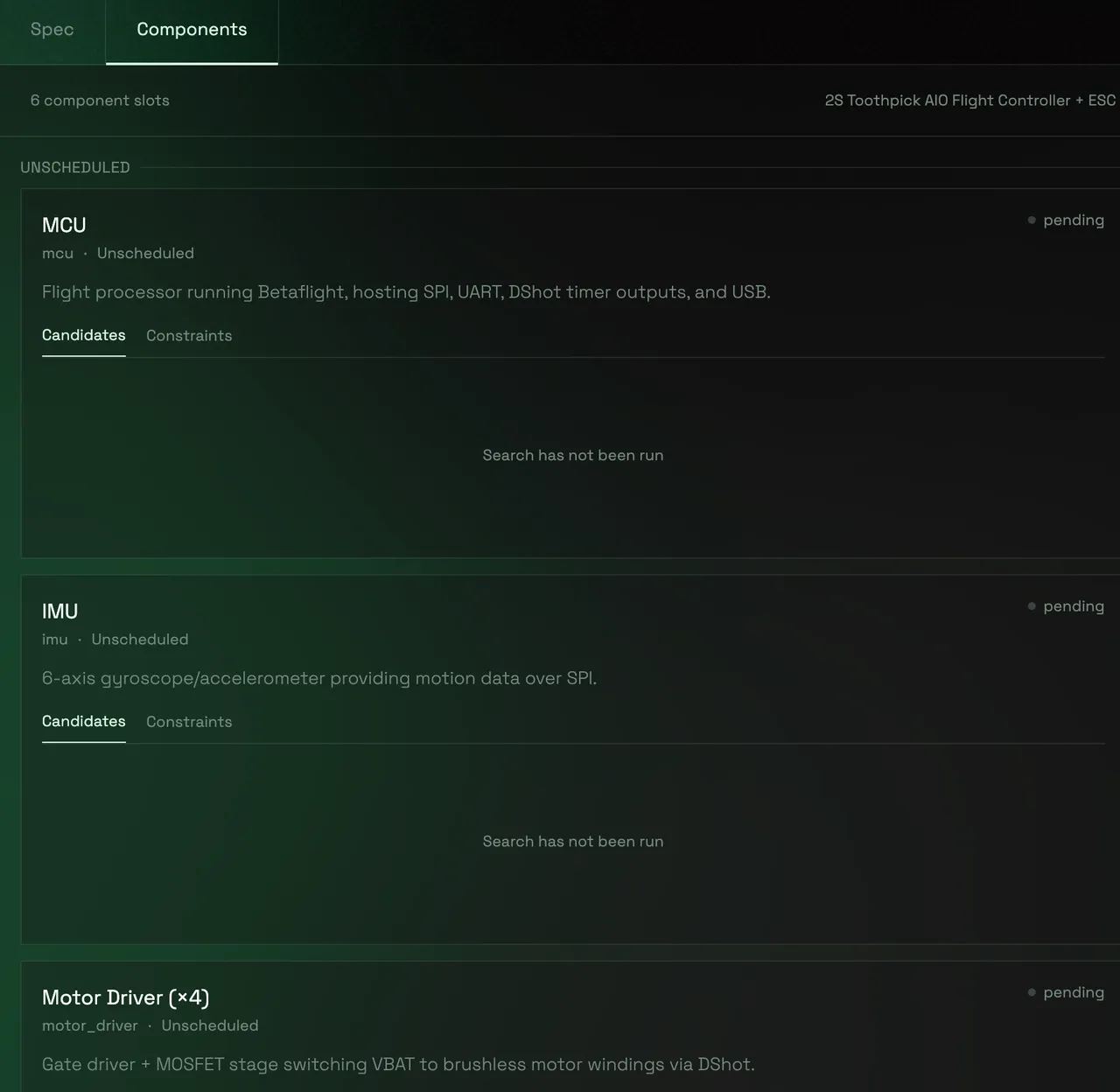
Formalization
The agent now has a functional picture of the drone and knows which components it needs to search for, so it can derive a system of equations that describe the design. The agent will think through which design dimensions and resource budgets are relevant here.
For our drone this is dominated by the power rail, that needs to ensure that our voltage converter circuit supplies the MCU and all other components according to their specifications. This may take a while as complex systems can have a high number of coupled specifications.
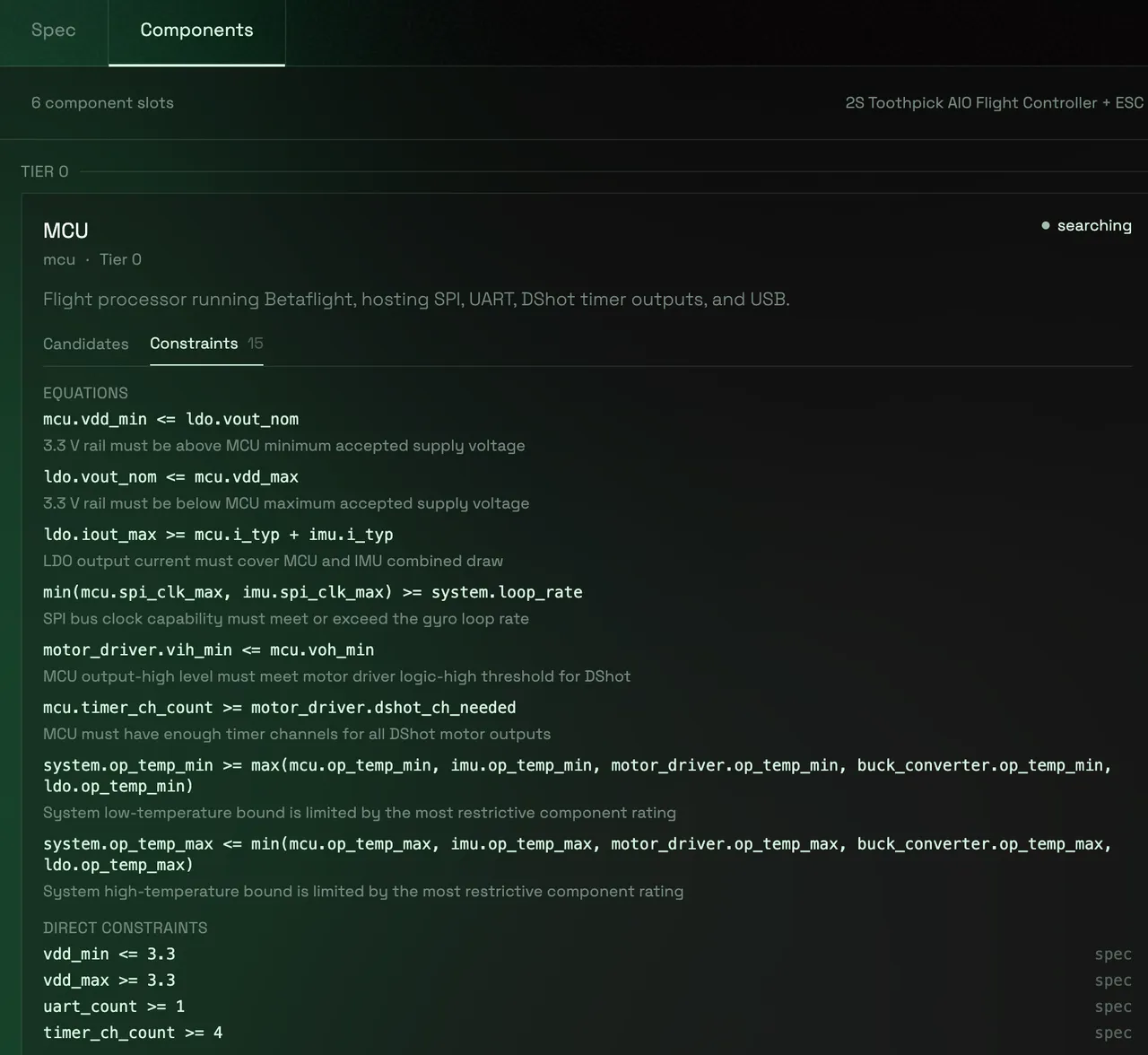
A good way to think about this is as a constraint graph. For the drone, the 3.3 V power rail is a simple example. Each component slot exposes a few variables the agent needs to care about: input voltage range, output voltage, maximum current draw, and so on.
If the user says the board runs from a single-cell LiPo, the system can pin the battery envelope:
The regulator then has to tolerate that input range:
Its output has to sit inside the acceptable voltage window of every downstream part:
And its current rating needs to cover the worst-case load, with some margin:
In the workspace these symbols are tied back to concrete component slots, like regulator_3v3.iout_max or mcu.icc_max. When you pick an MCU, its extracted current draw becomes a known value in the model. Later regulator candidates can then be checked against that choice instead of being searched in isolation.
After the equations are declared, the agent computes the optimal order for choosing the components. In the rail example, it can first lock the parts that define the load, like the MCU, IMU, and GPS module. Their voltage windows and peak currents then become fixed inputs for the later regulator search.
Component Candidate Search
Once Stillwind Builder has completed, it will give a choice of matching components that fit into the design, along trade-off axes like budget or performance. Expanding each option directly shows the extracted specifications of the component that are relevant for the design and the proof of where they were extracted from in the component's datasheet.
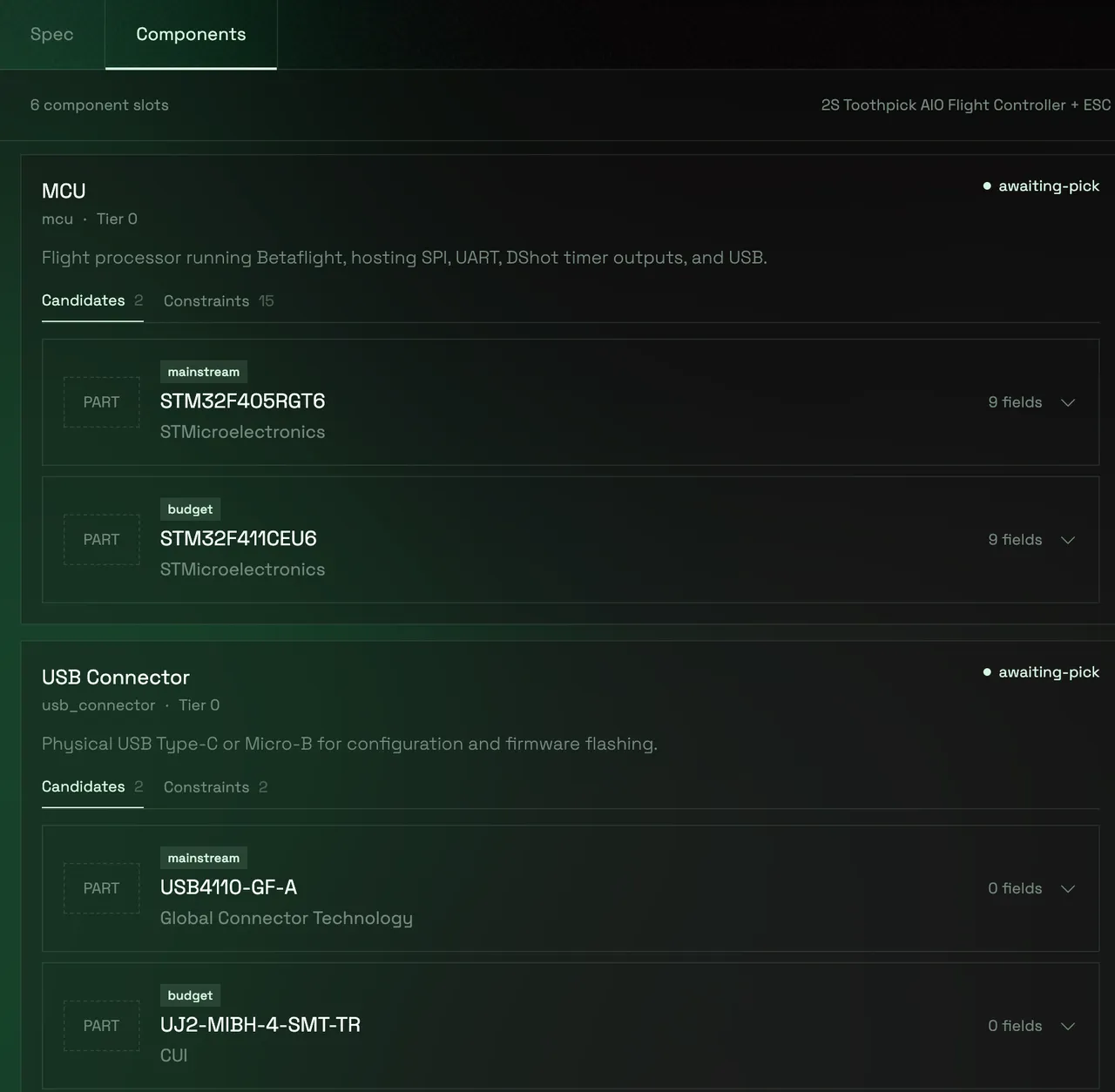
We continue to pick a component from the set of candidates. The component's extracted specification values, like the MCU's supply range and maximum current draw, will now be plugged into the system of equations, so later IMU, GPS, and regulator candidates can be checked against this choice.
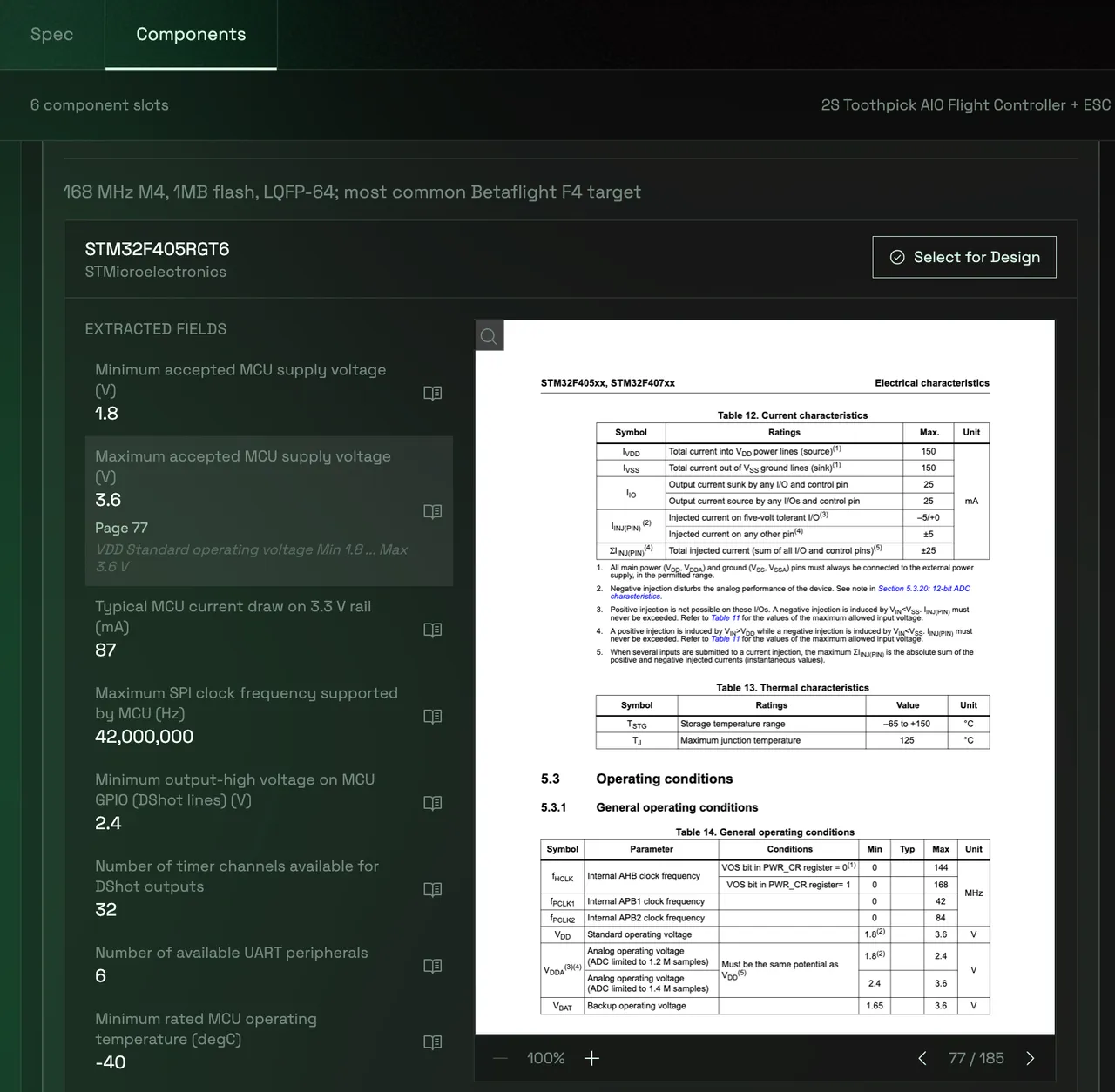
The search agent now proceeds to find the rest of the components, until all components are locked in.
Violation Detection and Backtracking
After each selection of a component the agent will check if the system of equations is still valid and all requirements are satisfied. If any of them is violated, say the GPS module and IMU together push the rail load beyond what the current regulator candidate can safely supply, the violation will be highlighted and it is up to us to decide to either relax the constraint or to re-run the search for a different component.
What’s up next?
Stillwind Builder targets the design workflow from idea to locked design. The steps coming afterwards, specifically drawing the schematic and routing the board, are similarly cumbersome and in many cases automatable if footprints are known. We are currently working on Stillwind Router, a global footprint library and an extension of the agent to automatically derive a wired and checked schematic and eventually a routed board.
Give it a try!
We give any new user two free requests to Stillwind Builder. We would also love to hear your feedback under contact@stillwind.ai!